
The HR Service Center in ReadyReturns can be used to manually create equipment return orders for employees.
- In ReadyCloud, open ReadyReturns.
- Select HR Service Center from the top menu.
- Use the Employee Search field to look for an existing employee return by name, email, or RMA number.
- If no existing record is found, select No record found. Create new Equipment Return.
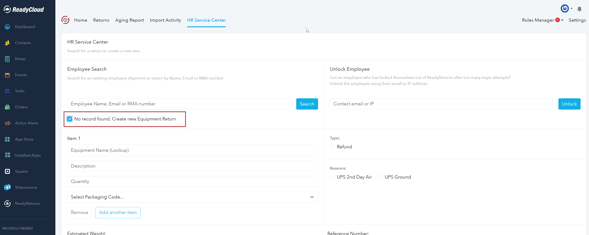
- Add the equipment being returned by selecting the Equipment Name and entering any required details such as:
- Description
- Quantity
- Packaging Code
- Click Add another item if more than one piece of equipment needs to be returned.
- Select the applicable Return Type and Return Reason, if configured.
- Complete the employee/contact and return shipment information further down the form.
- Review the return details and complete the return to generate the return shipment.
Tip: Equipment, packaging options, return reasons, and other available selections are based on the configuration in Rules Manager.