
ReadyShipper allows you to generate an End-of-Day Scan Form for supported carrier accounts so the carrier can scan a single form for the shipments included in that batch.
The steps are generally the same across supported shipping services:
- Open ReadyShipper.
- Go to Shipping from the top menu.
- Select the carrier or shipping service you want to create the form for.
- Click Create End Of Day Scan Form.
- ReadyShipper will generate the applicable scan form for that carrier/service.
- Print or save the form as needed and provide it to the carrier when the shipments are picked up or dropped off.
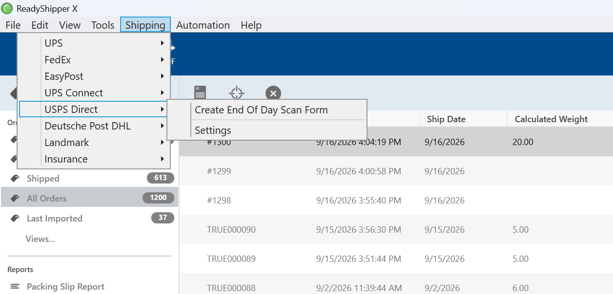
In the example shown above, the option is located under:
Shipping > USPS Direct > Create End Of Day Scan Form
Note: The exact menu options may vary depending on which carrier accounts are connected and enabled in ReadyShipper.